


Shopify 产品页面品牌风点击一键复制折扣码卡片分享
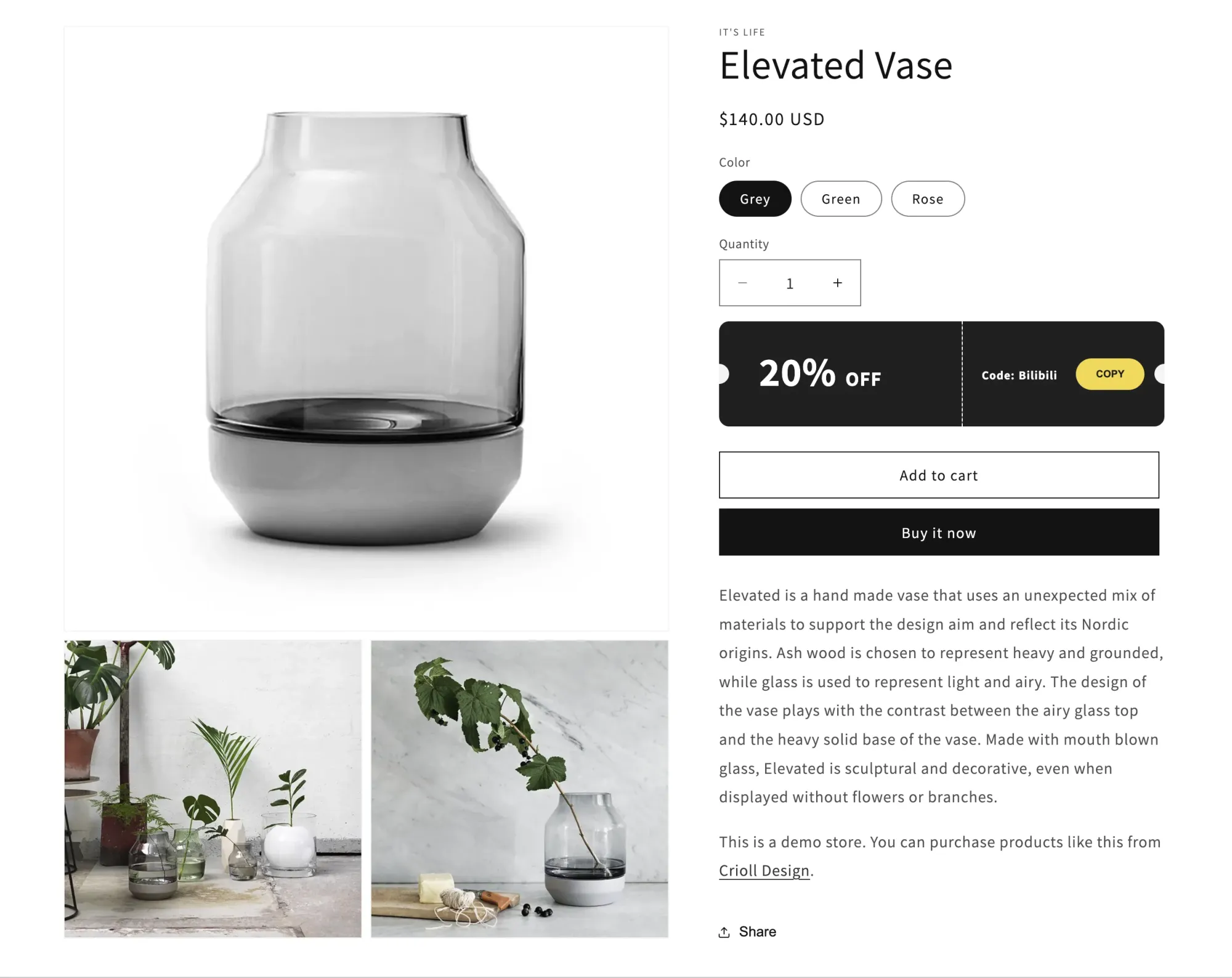
点击一键复制折扣码是很多 Shopify 店铺都需要的热门实用功能。关于折扣码复制相关的教程,之前我发布过 Shopify 产品页多个折扣码一键复制功能。
增强版 Shopify主题 中也已经自带了折扣码复制功能,而本期将要分享的教程算是一个补充,不论你使用增强版主题还是其他主题,都可以跟随教程添加使用。
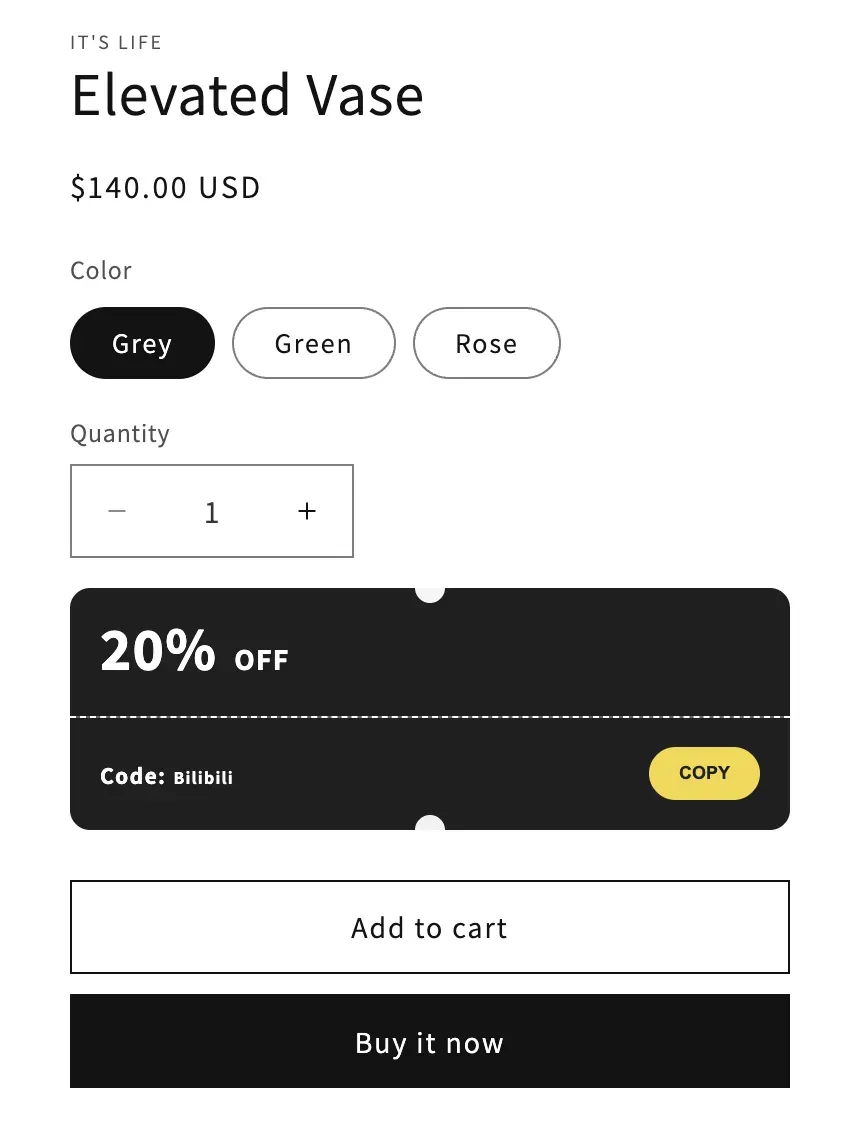
效果预览
电脑端
手机端
因为很多 Shopify 个人卖家或者中小公司很难既具备设计资源有具备技术资源(个人卖家难以既懂设计又懂技术,而很多小公司只有设计师没有前端员工),所以我分享这类教程给大家使用。
以前制作一项功能需要自己首先学到比较熟练的程度才能做出效果,或者花钱付费请人做。而现在只需要提供一张截图,然后根据你自己的需求进行优化。
也就是先从你的同行品牌网站上截取功能效果,通过 ScreenShot to Code 识别截图获得基本的网页代码,再通过 AI 代码编辑器通过自然语言沟通进行优化,比如让它添加点击按钮时的折扣码复制功能,调整背景色和字号、字重等等。
哪怕你们公司有前端工程师,提一项需求可能也得排期和等待,现在你自己都能搞定:
- 通过截图生成代码的视频示例
- 授人以鱼不如授人以渔:截图转代码安装和使用教程
直接使用
💡
新手提示:折扣码在 Shopify 店铺后台 ~ 折扣 (Discount)中创建。
创建 Snippet 保存代码,并在产品模板中直接使用 [code] {% render ‘copy-coupon’ %} [/code]
复制
💡
如果产品信息模块 ~ 媒体文件宽度设置为 “大”,可能导致右侧宽度不够,改成 “中” 即可
先创建文件: [code] copy-coupon [/code]
复制 [code]
.coupon { background-color: #222; color: white; display: flex; border-radius: 10px; position: relative; overflow: hidden; }
.coupon::before, .coupon::after { content: ""; position: absolute; width: 20px; height: 20px; background-color: #f5f5f5; border-radius: 50%; }
.coupon::before { top: 50%; left: -10px; transform: translateY(-50%); }
.coupon::after { top: 50%; right: -10px; transform: translateY(-50%); }
.coupon-left { flex: 1; padding: 30px 40px; display: flex; flex-direction: column; justify-content: center; }
.coupon-right { flex: 1; padding: 20px; display: flex; justify-content: space-between; align-items: center; position: relative; }
.coupon-right::before { content: ""; position: absolute; top: 0; left: 0; width: 1px; height: 100%; background-color: rgba(255, 255, 255, 0.3); border-left: 1px dashed white; }
.discount { font-size: 4rem; font-weight: bold; line-height: 1; margin: 0; }
.off { font-size: 2rem; font-weight: bold; margin-left: 5px; }
.limited { font-size: 1rem; margin-top: 5px; }
.code { font-size: 1.2rem; font-weight: bold; white-space: nowrap; }
.copy-btn { background-color: #f6dd51; color: #222; border: none; border-radius: 30px; padding: 10px 20px; font-size: 1rem; font-weight: bold; cursor: pointer; text-transform: uppercase; white-space: nowrap; transition: all 0.4s cubic-bezier(0.4, 0, 0.2, 1); }
.copy-btn:hover { background-color: #f0cc5f; transform: scale(1.15); box-shadow: 0 2px 8px rgba(0, 0, 0, 0.1); }
.copy-btn.copied { background-color: #90EE90; transform: scale(0.92); box-shadow: none; }
@media (max-width: 600px) { .coupon { flex-direction: column; }
.coupon::before, .coupon::after { width: 15px; height: 15px; }
.coupon::before { top: -7.5px; left: 50%; transform: translateX(-50%); }
.coupon::after { bottom: -7.5px; left: 50%; top: auto; transform: translateX(-50%); }
.coupon-right::before { width: 100%; height: 1px; top: 0; left: 0; border-left: none; border-top: 1px dashed white; }
.coupon-left, .coupon-right { padding: 15px; }
.discount { font-size: 3rem; }
.off { font-size: 1.5rem; }
.limited { font-size: 0.9rem; }
.code { font-size: 0.9rem; }
.copy-btn { padding: 8px 15px; font-size: 0.9rem; } } </style><div class="coupon-container"> <div class="coupon"> <div class="coupon-left"> <div> <span class="discount">20%</span> <span class="off">OFF</span> </div> </div> <div class="coupon-right"> <div> <span style="font-size: 1.2rem;font-weight: bold;">Code:</span> <span class="code">Bilibili</span> </div> <button class="copy-btn">COPY</button> </div> </div> </div>
<script> document.querySelector('.copy-btn').addEventListener('click', function () { const codeElement = document.querySelector('.code'); const code = codeElement.textContent;
navigator.clipboard.writeText(code) .then(() => { this.textContent = 'COPIED'; this.classList.add('copied');
setTimeout(() => { this.textContent = 'COPY'; this.classList.remove('copied'); }, 2000); }) .catch(err => { console.error('复制失败:', err); }); }); </script>[/code]
复制
批量添加和多组折扣
通过产品标签控制显示
你可能想要针对某些产品设置,所以我将演示通过产品系列筛选并添加 Tags 的方式来对特定的产品进行显示:
- 创建或确定需要使用的产品系列
- 通过产品系列筛选出商品
- 批量添加自定义标签,例如:
discount20 - 批量编辑之添加和删除 Shopify 产品标签 设置产品模板和元字段
代码: [code] {% if product.tags contains ‘discount20’%} {% render ‘copy-coupon’ %} {% endif %} [/code]
复制
在少数商品上展示折扣
如果你只想在某一款或者某几款商品上使用折扣,也可以用这种方式,商品比较少的话,Tag 直接在对应的产品编辑界面右侧添加即可。
多组折扣码
或者如果你想添加多组折扣(不够优雅但对新手友好,易于理解): [code] {% if product.tags contains ‘discount20’%} {% render ‘copy-coupon-20’ %} {% elsif product.tags contains ‘discount15’ %} {% render ‘copy-coupon-15’ %} {% endif %} [/code]
复制
样式优化
- 如果你想对这个功能进行个性优化,例如调整背景色等
- 或者修改 Shopify 网站上的其他内容样式,可以参考这个教程:
支持与分享
如果这篇文章对你有帮助,欢迎分享给更多人或打赏支持!